A comprehensive guide to Telegram privacy and security settings and practical functions for using Telegram robots
Jun 15, 2026
Telegram has over 700 million users worldwide and is the most popular communication tool for privacy followers and international community users. Today's article focuses on the usage of Telegram, privacy and security settings, and practical tips to help people who need this tool use it well.
1、 Account registration and basic settings: The first step is to do it right, reducing the risk in the later stages by half
Telegram account registration requires phone number verification. Domestic phone numbers (+86) can be registered normally, but the first registration requires receiving a SMS verification code. If there are problems with SMS reception (which may occur on some dual SIM phones), you can try voice verification. After completing the registration, it is recommended to do the following things as soon as possible: First, set a strong password (8 characters or more, including letters, numbers, and special symbols), and enable two factor authentication (2FA), which is the most critical action to protect the account; Secondly, update your phone number to the latest version (Settings → Privacy and Security → Phone Number). It is recommended to set it to "Nobody" or only make it visible to contacts to avoid strangers discovering your phone number through group chats and other channels; Thirdly, set a username instead of just using your phone number to search?? Telegram allows users to set a public username (similar to @ username), which others can use to find you without needing to know your phone number. In terms of account security, there is a principle to remember: any request to log in through SMS verification code may be a phishing attack. If someone claims to "help you receive the verification code" or "a friend asks you to help verify" and sends the verification code, your account may be taken over by someone else at any time. Telegram's verification code should only be used to log in to your own account and should not be shared with others under any circumstances.
2、 Secret Chat: Real end-to-end encryption, leaving no trace on the server
Telegram has two chat modes: regular chat and secret chat. The biggest difference between the two lies in the encryption method: regular chat uses client to server encryption, which means that your message is encrypted during transmission, but Telegram's server has decrypted data backups; Secret chat adopts end-to-end encryption, only you and the other party can decrypt the message content, there is no record on the Telegram server, and it supports the function of burning after reading. The way to start a secret chat is to click on the other person's name on the contact page, enter the chat information page, and select "Start Secret Chat". The following characteristics of secret chat are worth noting: it can only be viewed on the device that initiated the conversation, and the secret chat records will not be synchronized after changing phones (this is the cost of end-to-end encryption); You can set the automatic message destruction time (ranging from 1 second to 1 week), and when the other party takes a screenshot, their device will receive a notification (but it cannot prevent them from taking photos with another device); Secret chat does not support forwarding, nor does it support @ other people in the chat. These restrictions are all aimed at maximizing privacy protection. Secret chat is suitable for transmitting sensitive information, such as account passwords, important files, or any content that you do not want to be retained by the platform.
3、 Privacy and Security Settings: These switches determine your level of exposure
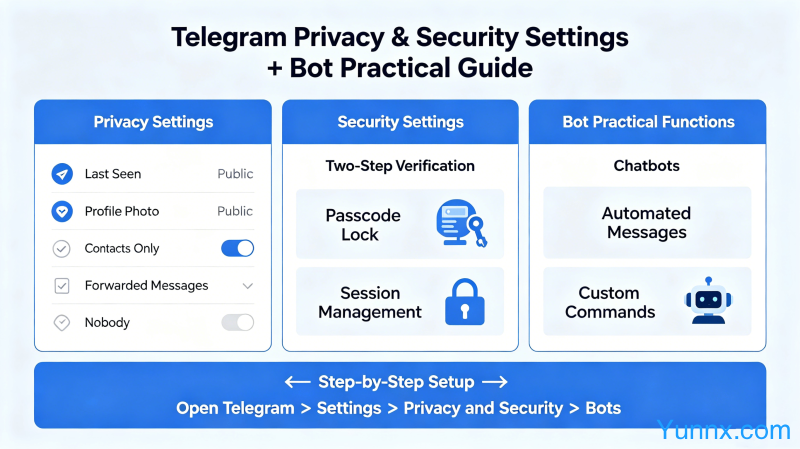
The privacy settings of Telegram are hidden in "Settings → Privacy and Security", which is the most important settings page of the entire app. The following switches and suggestions must be known: First, it is recommended to set "Contacts Only" for "Last Seen&Online" (last online time and status)?? This way, only your contacts can see when you are online and if you are online, and non contacts cannot see it. There is a detail to note here: the permission for you to see someone else's online status and the permission for others to see your online status are set separately and can be set asymmetrically. Secondly, it is recommended to set the "Profile Photos" to "Contacts Only" to prevent strangers from seeing your profile picture and saving it. Now Telegram also has an "anti save avatar" function, which can be enabled in the Privacy settings. Thirdly, is it recommended to set "My Contacts" for "Groups&Channels"?? This way, strangers cannot easily drag you into various advertising groups or unknown groups. If you want to be stricter, you can set it to "Never" and manually add people who allow you to be added to the group. Fourthly, is it recommended to turn off 'Forwarded Messages' (displaying the source of forwarded messages)?? After activation, when others forward your message, your name will not be displayed (only "Forwarded from..." will be displayed), which better protects your identity information. Fifth, regularly check for 'Active Sessions'?? Here is a list of all devices that have logged into your account. If any suspicious device is found, click terminate immediately to end the session and change the password.
4、 Channels and Groups: Core Gameplay of Telegram's Community Ecology
Telegram's channels and groups are its core social features that distinguish it from other instant messaging tools. Channel is a one to many broadcasting tool, where administrators post messages and all subscribers receive them, suitable for content distribution and information announcement; The group can support up to 200000 members and is suitable for large-scale community operations. Compared with WeChat groups, Telegram groups have the following unique advantages: they can set a "ban history" (new members cannot see their chat history before joining); You can set a silent mode where only administrators speak; Users with different permissions can be set up (administrators, regular members, restricted members); Messages can be set to "top" without disrupting the chat flow. Subscription to a channel is also very simple. Search for the channel name or keywords in Telegram, find the target channel, and click "Join". Domestic users using Telegram channels need to be aware that some channels have unknown sources of content, spread unverified information, and even pose a risk of fraud?? It is recommended to remain highly vigilant against any channels that involve money transactions, investment management, or false news. Telegram itself does not censor channel content, and you need to have the ability to discern information on your own. For users who have the idea of creating their own channel, it should be noted that the channel's popularity growth mainly depends on high-quality content output and word-of-mouth communication. There is no algorithm recommendation mechanism like Tiktok, so they need to be patient and continue to do content.
5、 Robots: Telegram's Most Powerful Scalability
Telegram Bot is the most playable feature in its ecosystem. Bot is essentially an automated account that can help you complete various tasks: RSS subscription push (automatically sending website updates to you), file management (cloud storage, file conversion), group management (automatic ad kicking, keyword filtering), weather query, translation, workflow automation, etc. Using a Bot does not require programming, simply search for the Bot name and add it. A few practical bot recommendations: @ BotFather is Telegram's official bot creation tool. If you want to create your own bot, you need to register through it; @Tchannelsbot can search and discover various high-quality channels; @RSSBot can push RSS subscriptions from any website to Telegram; @IFTTT or @ ZapierBot can connect various third-party services to achieve automated workflows; @Gamee is a gaming bot that allows you to play lightweight games while chatting. Creating a custom Bot requires obtaining an API Token through BotFather. Users with programming skills can use the Bot API to do more, but for most ordinary users, ready-made Bot can already cover most of their needs.
6、 Data backup and multi device synchronization
Is Telegram's cloud synchronization mechanism different from other instant messaging tools?? It stores chat records in the cloud by default, and automatically synchronizes chat records when logging into an account when changing phones, without the need for manual backup. The advantage of this mechanism is convenience, but the disadvantage is that you do not have complete control over the data (which is stored on Telegram's servers). If you have extremely high demands for data privacy, Telegram is not the best choice (Signal is a more extreme privacy solution). In terms of multi device login, Telegram supports simultaneous login and use on multiple devices, including mobile phones, tablets, computers, and web versions, with real-time message synchronization across all devices. However, it should be noted that the secret chat can only be viewed on the device that initiated it, and cannot be seen on other devices. If you want to log out of all devices, there is an option to "Terminate All Other Sessions" in the Privacy&Security settings. In addition, Telegram also provides a "chat folder" function, which can categorize and manage chats on different topics, such as separating work groups and friend groups to avoid information overload. To sum up, the core values of Telegram lie in privacy protection and an open community ecosystem. The key to using it correctly lies in: the first step is to set up two-step verification to protect account security, the second step is to configure privacy settings according to needs, and the third step is to expand its functionality using channels and bots. Telegram is not a "replacement for WeChat" tool, but an alternative to WeChat?? Its privacy attributes and internationalization features give it irreplaceable advantages in specific scenarios such as international communities, privacy sensitive communication, and open-source project collaboration.
Recommend Apps