Is Discord Nitro worth driving? Nitro subscription function detailed explanation and common questions
Jun 08, 2026
DiscordNitro is a paid subscription service for Discord, providing value-added features such as high-definition screen sharing, personalized emojis, and custom avatar frames. This article provides a detailed introduction to the functional differences, subscription methods, and common issues between DiscordNitro and NitroBasic versions.
Discord Nitro Version Introduction
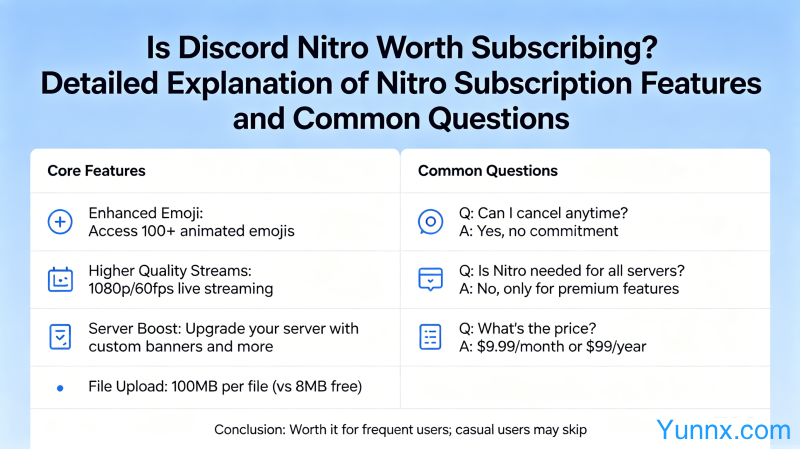
1. Discord Nitro has a monthly fee of $9.99 or an annual fee of $99.99 (equivalent to an average of $8.33 per month), providing all premium features.
2. Discord Nitro Basic costs $2.99 per month and provides some core features, suitable for light users.
3. Both versions can use basic features such as custom avatar frames, personalized emoticons, and uploading larger files.
4. Nitro exclusive features require a full subscription to use, including high-definition screen sharing, avatar video animations, custom server backgrounds, and more.
Detailed explanation of Nitro's core functions
1. High definition screen sharing. Free user screen sharing up to 720p30fps, Nitro users can enjoy 1080p60fps high-definition sharing, with a significant difference in image quality.
2. Avatar video animation. Nitro users can set MP4 or GIF as their personal avatar, and dynamic avatars make your account more personalized.
3. Customize emoticons. Nitro users can upload personalized emoticons under 50MB on any server, supporting any image format.
4. Customize the server background. Nitro users can set personalized background images for the server to enhance its visual effect.
Nitro Basic Features
1. File upload improvement. The maximum file size for free users is 8MB, which has been increased to 50MB for Nitro Basic and 500MB for Nitro Full Version.
2. Customize avatar frames. Nitro Basic users can use basic avatar frame decoration features.
3. Use emoticons. Subscribed emojis can be used on all servers, but new emojis cannot be uploaded.
4. Server personality bonus. Nitro Basic can add additional emoji slots and personalized backgrounds to the server.
Subscription Method and Payment
1. Click on the user avatar in Discord ->subscribe to Nitro ->select the subscription plan ->complete the payment.
2. Payment methods support credit cards, debit cards PayPal。 Chinese users need cards that support foreign currency payments to subscribe.
3. It will take effect immediately after subscription. Login accounts on any device will automatically synchronize Nitro status.
4. Unsubscribe. You can cancel at any time on the subscription management page, and you can still enjoy the feature until the end of the current payment period after cancellation.
Frequently Asked Questions
1. Can I get a refund after subscribing? Discord subscriptions generally do not support refunds unless there are technical issues that prevent them from being used.
2. Gift subscription. You can purchase Discord Nitro gift codes to give to friends, and the gift codes are valid for one year.
3. Family sharing. Discord Nitro cannot be shared with others, but the same account can be used on a home computer.
4. The subscription has expired. If the subscription expires, personalized avatar frames, emoticons, etc. will be restored to their default state, but data will not be lost.
Recommend Apps