How to develop Telegram Bot? Complete tutorial on Telegram robot creation and automation function implementation
Jun 07, 2026
TelegramBot is one of the most powerful extension capabilities of the Telegram platform, allowing developers to create various tools such as automatic replies, group management, and content aggregation. This article provides a detailed introduction to the creation method, commonly used API interfaces, and Python development examples of TelegramBot.
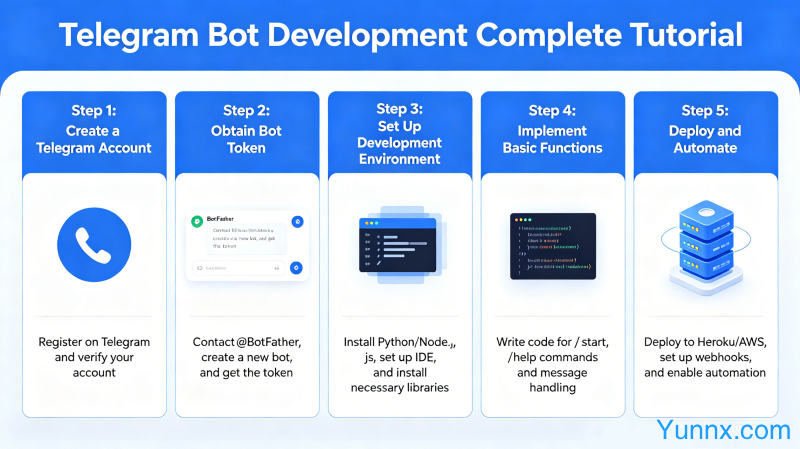
Create your first bot
1. Open Telegram and search for "@ BotFather". This is the official bot creation tool provided by Telegram, which can create and manage your bots.
2. Send the '/newbot' command. BotFather will ask you to enter the robot name (display name) and username (username). The username must end with 'bot', such as' MyFirstBot '.
3. After successful creation, BotFather will return an HTTP API Token in a format similar to "110201543: AHHdqTcvCH1vGWJxfSSofSAs0K5PALDsaw". This token is a credential for calling the Bot API and must not be leaked to others.
4. After obtaining the Token, you can start developing your Bot. Suggest saving the Token to an environment variable or configuration file first.
Bot API Core Interface
1. Get new messages: Using the getUpdates interface, you can get the latest messages received by the Bot. Get once per request, it is recommended to use long polling to continuously monitor.
2. Sending a message: Use the sendMessage interface to send a message to a specified user or group by specifying the chat_id and text parameters.
3. Setting up Webhooks: Webhooks are a more efficient way to receive messages compared to getUpdates polling. You need to have a public network server, and Telegram will post new messages to your Webhook address.
4. Other commonly used interfaces: sendPhoto (send image), sendDocument (send file), AnswerVNet Query (reply button click), etc.
Practical Python Development
1. Using the Python torch bot library can greatly simplify development. Execute 'pip install python torch bot' installation on the command line.
2. Basic framework example:
from telegram import Update
from telegram.ext import Application, CommandHandler, MessageHandler, filters, CallbackContext
3. Register the command processor. When the user sends'/start 'or'/help ', the corresponding function is automatically called in response. Multiple commands can register multiple handlers.
4. Register a message processor. Automatically reply to non command messages (such as regular text), suitable for use as an automatic reply robot or chatbot.
Common Bot Function Development
1. Automatic keyword replies. Monitor all messages and automatically send corresponding reply content when the message content matches the preset keywords. Suitable for being a customer service robot.
2. Inline keyboard buttons. When sending a message, bring the Inline keyboard button, and when the user clicks it, trigger callback_query, which can achieve an interactive menu.
3. Group management bot. Monitor group messages, automatically delete ad links, limit speaking frequency, handle new member verification, etc. When creating, it is necessary to add the Bot to the group and grant administrator privileges.
4. Content aggregation bot. Regularly crawl website RSS or API and automatically push new content to subscribers. Suitable for news aggregation or price monitoring bots.
Bot Security and Deployment
1. API Token is a unique identity credential and must not be hard coded in code or submitted to GitHub. Suggest using environment variables or configuration file management.
2. HTTPS must be configured when using Webhooks. Telegram only supports HTTPS callback addresses, and you can apply for a free SSL certificate using Let's Encrypt.
3. Group management bots require careful permission settings. Opening too many permissions may lead to the abuse of bots, it is recommended to grant only necessary permissions.
4. It is recommended to use Docker containerization for deployment in production environments, in conjunction with a supervisor or systemd to keep processes resident. Logging should be done well to facilitate troubleshooting.
Recommend Apps