How to carpool on YouTube Premium Home Edition? YouTube Premium and Music Family Plan Shared Tutorial
Jun 03, 2026
YouTube Premium Home Edition can be shared by up to 6 people, averaging less than $3 per person per month. But many people don't know how to operate, what restrictions there are, and whether it will affect their privacy. This article provides a detailed explanation of the joining method and usage precautions for the YouTube Premium family plan.
The difference between YouTube Premium Home and Single Edition
Before deciding whether to subscribe to the Home Edition or not, first clarify the differences between the Home Edition and the Single Edition:
1. The price difference is huge. The single player version of YouTube Premium is priced at $11.99 per month in the US region, while the home version is priced at $22.99 per month. The family version can be used by up to 6 people, averaging less than $4 per person, saving over 60%.
2. The functions are completely consistent. The core functions of the home version and the single player version are no different: ad removal, background playback, offline download, YouTube Music Premium permission, all functions are the same.
3. Geographic location requirements. All members of YouTube Premium Home must reside at the same address. This is a policy requirement of Google, which verifies home addresses through GPS positioning and other methods. Members who do not meet the criteria will be removed.
4. Administrators and members have different permissions. Family subscribers become "family administrators" and can add or remove members. Other members are 'family members' who enjoy Premium benefits but cannot manage subscriptions.
5. Refund and subscription management. Only administrators can manage subscriptions, unsubscribe, or apply for refunds. Family members are unable to directly subscribe and require an administrator to handle it.
How to create or join a YouTube Premium family group
There are two ways to obtain the family version: create your own family group or join someone else's existing family group. The following are the specific operational steps:
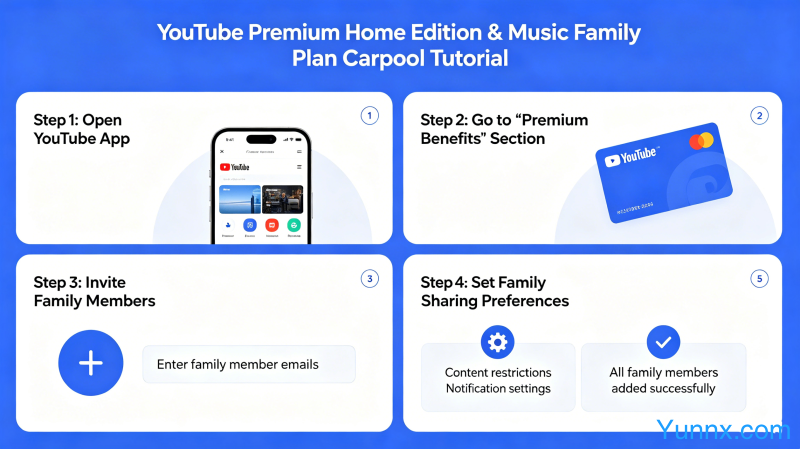
1. Method to create your own family group: Open the YouTube web version or app, click on the avatar in the upper right corner - "Purchase or Upgrade Membership" - select "Family Plan" - fill in payment information - complete the subscription. After successful subscription, you will become a home administrator.
2. Administrator adds family members: Find the "Family Members" option in YouTube settings, click on "Add Family Members", enter the recipient's Google account, email, or phone number to send the invitation. After accepting the invitation, the other party can use Premium.
3. Invited to join the family group: After receiving the invitation email or message, click on the link and log in to your Google account, follow the prompts to confirm joining. Effective immediately upon joining, no need to re subscribe.
4. Join indirectly through the Google One family group. If you are a Google One subscription user, you may already have a Google Homegroup. In this case, administrators can directly add YouTube Premium family members in Google One settings.
5. Precautions for cross regional subscriptions. The price of YouTube Premium varies in different regions, and it is recommended that family members choose to subscribe in the same region as much as possible. If cross regional payment is necessary, the administrator needs to use the payment method for the corresponding region.
YouTube Music Premium Home Edition Detailed Explanation
YouTube Premium includes YouTube Music Premium, but if your main need is listening to music, subscribing to YouTube Music Premium Home Edition separately may be more cost-effective:
1. YouTube Music Premium Home Edition is priced at $15.99 per month (US region) and can be used by up to 6 people. A separate subscription is much cheaper than buying 6 individual versions separately.
2. The features of YouTube Music Premium include: ad free music listening, background playback, offline download, and pure audio mode (only playing audio and not videos when the screen is locked).
3.The difference between Music Premium and YouTube Premium is that Music Premium can only listen to music and cannot enjoy the ad removal and offline features of YouTube videos. If both are needed, it is recommended to subscribe directly to YouTube Premium Home Edition.
4. YouTube Music Home Edition members can see each other's listening history and playlists. If you don't want others to see your music preferences, be cautious about joining a stranger's family group.
5. How to subscribe to Music Premium separately: Click on the profile picture in the YouTube Music app - "Upgrade" - select "Family Plan". Alternatively, on the YouTube web version, go to the "Buy or Upgrade Membership" page and select Music Premium Home Edition.
Privacy and Security Issues in Family Sharing
Many people are concerned that joining someone else's family group may compromise their privacy, or creating their own family group may pose risks. The following is a detailed explanation:
1. Information that administrators can see: Administrators can only see your YouTube usage activity (such as viewing history), but cannot see your Google account password, Gmail emails, Google Drive files, and other Google service content.
2. Content that cannot be seen among family members: detailed viewing history of each individual YouTube video (only aggregated statistics can be seen), search history, and specific content of subscription lists. Google is quite effective in protecting privacy.
3. Administrator's permission to remove members: Administrators can remove any member at any time, and the Premium benefits of that member will immediately expire after removal. So joining a stranger's family group carries the risk of being kicked out.
4. Impact of unsubscribing: If the administrator cancels the entire household subscription, all members will lose their Premium benefits. So joining someone else's family group carries the risk of 'sudden termination of subscription'.
5. It is recommended to join a family group of acquaintances rather than strangers. If you really want to join a stranger's family group, choose a platform with good reputation, understand the administrator's reputation in advance, and clarify the rights and obligations of both parties.
Safety precautions for carpooling platforms
There are many online services that help people join YouTube Premium family groups, commonly known as "carpooling". The following points should be noted when using these services:
1. Choose a reputable platform. For example, some forums and Discord groups that specialize in family carpooling have comprehensive member management and dispute resolution mechanisms. Avoid private transactions through links of unknown origin.
2. Understand the risk control of the platform. Google will regularly check the geographical location of members in the family group. If it is detected that the members are not at the same address, the entire family group may be disqualified from Premium status.
3. Communicate clearly in advance about the cost sharing method. It is recommended to use Alipay, WeChat and other guaranteed payment methods to avoid one-time prepayment for too many months. If the administrator runs away, the losses are relatively controllable.
4. Confirm the administrator's renewal ability. Some family groups suddenly lose their benefits due to the administrator forgetting to renew. Choose a reliable administrator or become an administrator yourself to avoid this risk.
5. Understand the consequences of being kicked out. If you are removed by the administrator, you may not be able to receive a refund during the remaining subscription period. You need to bear this risk yourself, or agree on the rules before carpooling.
Summary
YouTube Premium Home Edition is indeed a very cost-effective choice, especially for users who frequently watch YouTube, where the value of advertising and background playback far exceeds the subscription fee. If you have friends around you who are also using YouTube, forming a family group is the most economical way. If you can only join through carpooling, try to choose reliable channels, clarify the rights and obligations of both parties, and avoid subsequent disputes.
Recommend Apps