Telegram Privacy Protection and Anti Harassment Settings: How to Completely Hide Online Status and Phone Numbers
Jun 02, 2026
Telegram's privacy settings are very flexible but also complex, and many users do not know who sees their phone numbers, who can see their online status, or how to block messages from strangers. This article provides a detailed explanation of the various options for Telegram privacy settings and how to configure them correctly to maximize personal privacy protection.
Why is Telegram's privacy issue worth paying attention to
Telegram is known for its "privacy and security", but this does not mean that it is default private. Many settings require manual adjustment, otherwise your information may be more public than you imagine.
1. Phone numbers are Telegram's biggest privacy vulnerability. Registering on Telegram requires a phone number, and by default, your contacts can find you through your phone number. This means that if someone knows your phone number, they can search for you on Telegram and send you messages.
2. 'Last Seen' is another sensitive information. By default, everyone can see when you are online and offline. This information can be used to infer your daily routine.
3. Telegram has experienced large-scale data breaches. Although Telegram officially denies it, there have indeed been databases on the black market that contain the correspondence between Telegram users' phone numbers and usernames.
4. The group recruitment mechanism is also a privacy risk point. If you are in a group, your phone number may be obtained by members of the same group. The 'Add to Groups' permission on Telegram can restrict who can add your account to the group.
Compared to WeChat and WhatsApp, Telegram has richer but more complex privacy settings options. Properly configuring these options requires time to understand the meaning of each option.
Basic privacy settings: phone number and username
The phone number is the core identity identifier of Telegram and also the biggest source of privacy risk.
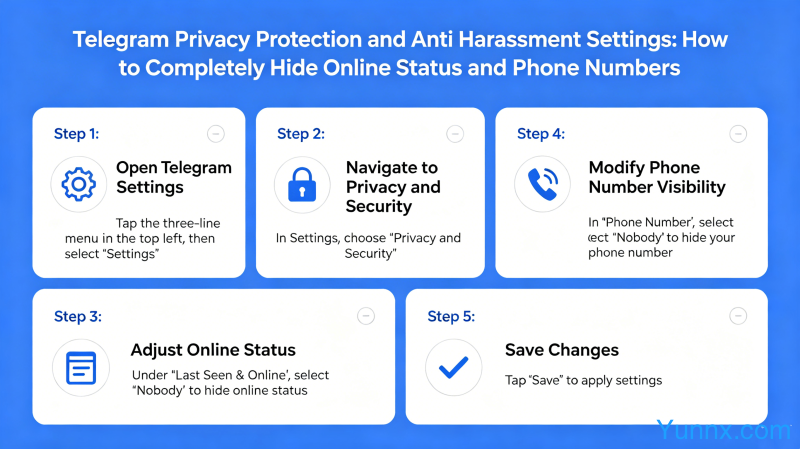
1. Modify "Who can find me through my phone number": Go to Settings → Privacy and Security → Phone Number. Choosing 'unmanned' can completely hide your phone number, but this means that new contacts cannot find you through your phone number. You can use your username to help others find you.
2. Set the username. Telegram's username is similar to Weibo @. After setting it up, others can add you by @ your username without needing to know your phone number. Suggest setting a unique and difficult to guess username.
3. The setting for "last online time" is on the same "Privacy and Security" page. It can be set as' No one ',' Contacts', or 'My Contacts Except...'. After setting it to 'no one', others cannot see your online status, and you cannot see each other's.
4. The visible range of the avatar also needs to be set separately. By default, it is visible to everyone, but you can set the avatar to only be visible to contacts in your privacy settings, or specify that certain people can see it.
5. The 'Forward Message' option controls whether your name will be displayed when others forward your message. Suggest keeping the default "My Contacts" instead of changing it to "Everyone".
How to block messages from strangers
Harassment messages are a common issue among Telegram users, especially if you are active in the group or have made your username public.
1. Find the "Messages" setting in "Privacy and Security". You can set two rules: 'allow' and 'not allow'. For example, setting "Do not allow" all non contacts to send you messages, so that only people you have actively contacted or users you have added as contacts can send you messages.
2. Use the "Read Receipt" function to detect whether the other party has read your message. But when you enable this feature, the messages you send yourself will also display a read status, and users who do not like to be "urged" can choose to turn it off.
3. Reporting and blocking function: In any chat interface, click on the other party's avatar → More (three dots) → "Report" or "Block". If the reported account is verified by Telegram to have violated regulations, its functionality may be restricted.
4. Set the "invitation link" permission. Strangers sometimes enter the same group through invitation links and harass you. Set the "Group/Channel Invitation" permission in "Privacy and Security" to restrict who can add you to the group through the invitation link.
5. Use the "secret chat" function. Secret chats use end-to-end encryption, messages are not stored on Telegram's servers, and automatic message destruction times can be set. Suitable for handling communication of sensitive information.
Advanced privacy protection: anti tracking and anti monitoring
For users with higher privacy requirements, Telegram also provides some advanced settings.
1. Enable two factor authentication (2FA). This is equivalent to adding a password to your account, even if someone obtains your phone number and SMS verification code, you cannot log in to your account without the two-step verification password. Setting location: Settings → Privacy and Security → Two Step Verification Password.
2. Set up active session management. Telegram supports multiple devices to be online simultaneously, and if abnormal devices are detected, they can be logged out remotely. Settings → Privacy and Security → Active Session, you can see all devices logged into your account, and devices you don't know can be directly "terminated".
3. Regularly clean login devices. It is recommended to check active sessions at regular intervals and promptly remove devices that are no longer in use. Especially if you have logged into Telegram on a public computer before.
4. Use the "anonymous group" function. If you are an administrator of a group, you can enable "anonymous mode" so that your identity will be displayed as "Hidden User" instead of your real account. Suitable for community operators who do not want to expose their management identity.
5. Pay attention to Telegram's cloud synchronization mechanism. Ordinary chat content will be synchronized to Telegram's servers, which means theoretically Telegram officials can access these contents. If you want to chat about very sensitive information, please use "secret chat" instead of regular chat.
Emergency response after being harassed by strangers
Even with all the settings, harassment can still occur at times. The following are the handling methods after being harassed.
1. Immediately block the other party. Click on the other person's avatar in the chat interface and select "Block". After being blocked, the other party cannot send you messages anymore, but if you kick them out or leave the group, you may still be harassed by strangers.
2. Report the other party's account. If the other party has obvious harassment, fraud, or posting illegal content, click "Report" and select the reason for reporting. Telegram will review reports and may restrict reported accounts.
3. If someone is harassing in the group, try to ban or kick them out of the group first. If it is a public group and the management difficulty is high, you can choose to "report users" and consider quitting the group.
4. Change username and privacy settings. If your username is already known by a stranger, you can consider changing to a new username that is not so easy to guess.
5. If you encounter serious online violence, threats, fraud, and other behaviors, in addition to reporting them internally on Telegram, you should also consider reporting them to the local police. Telegram will cooperate with law enforcement agencies' legal requests.
Summary
Telegram's privacy settings are actually very comprehensive, but it takes time to understand and configure them. The core principle is to not allow strangers to see any of your information by default, and to use your username to help people you know find you; Enable two-step verification to prevent account theft; Regularly check active sessions to prevent being logged in by unfamiliar devices. By doing these configurations well, Telegram can actually achieve a high degree of privacy protection.
Recommend Apps