How to use WhatsApp Business? WhatsApp Business Account Function Settings and Customer Management Complete Tutorial
Jun 02, 2026
WhatsApp Business is a version of WhatsApp specifically designed for small and medium-sized enterprises and businesses, supporting practical features such as automatic replies, tag management, and product catalogs. This article provides a detailed explanation of WhatsApp Business's download and installation, business profile settings, automatic reply rules, and customer management techniques to help businesses efficiently operate private domain traffic.
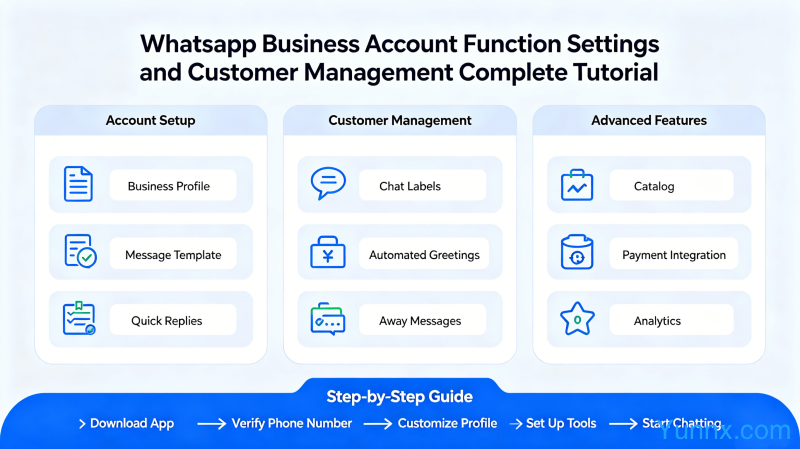
The difference between WhatsApp Business and regular WhatsApp: Should I switch?
Before starting to use WhatsApp Business, it is important to understand the differences between it and regular WhatsApp, as well as which users are suitable for using it:
1. WhatsApp Business is the official business version of WhatsApp, which is free to download and can be installed by searching for "WhatsApp Business" on Google Play and Apple App Store. Share the same app icon as regular WhatsApp, but with a different package name, and can be installed on the same phone at the same time.
2. Regular WhatsApp can also be used for commercial purposes, but its functionality is very limited. WhatsApp Business provides core features such as business information pages, automatic replies, quick replies, tag management, and product catalogs that are not available in the regular version.
3. If a WhatsApp Business account is reported by a user or violates usage policies, there is a risk of being banned. After being banned, your customer chat records can be restored through backup, but the business account needs to be re registered. Suggest important customers to retain through other channels at the same time.
4. WhatsApp Business is suitable for the following scenarios: e-commerce sellers, micro businesses, foreign trade practitioners who need to communicate with overseas customers, offline store customer service, service industry practitioners who need cross-border communication such as tourism/study abroad/purchasing agents, etc.
5. A mobile phone number can only register one WhatsApp account and cannot switch between the regular and business versions at the same time. Before registering for the commercial version, it is recommended to back up important chat records and data from the regular version.
WhatsApp Business Download, Installation, and Initial Settings
After completing the download and installation, it is necessary to configure the business information correctly in order to maximize the value of WhatsApp Business. The following is the complete initial setup process:
1. After downloading and installing the WhatsApp Business app, register using your phone number (it is recommended to use a dedicated work phone number or install it on your work phone). After the verification code is passed, can you set your business name?? This is the first message that users see about you, it should be concise, easy to remember, and have a brand sense.
2. After completing the basic settings, go to "Settings - Business Information" to complete the following required information: merchant category (such as "clothing store", "travel agency"), address (physical store address or online store address), business hours, official website, merchant profile description. The more complete the information, the higher the user's trust in you.
3. Upload the merchant logo and cover image. It is recommended to use a uniformly designed brand logo with a clean background and clear main body. The cover image can be a store photo, a hot selling product image, or a brand banner, with a recommended size of 1080 × 1920 pixels.
4. Configure your greeting and departure message. Are these two things very important?? Automatically send a greeting when a new customer sends you a message for the first time, and send a departure message when you are unable to reply outside of working hours. Good greetings and departure messages can significantly enhance the customer experience.
5. Set up the "Quick Reply" template. Quick reply is a commonly used pre written reply phrase that can be sent with just one click when receiving a specific message, saving typing time. For example, if a customer asks "Is there free shipping?", you can set a quick reply to "Free shipping nationwide for orders over 299 yuan, actual shipping fees will be charged for orders under 299 yuan
Detailed explanation of automatic reply function: How to set up intelligent customer service
Automatic replies are one of the most valuable features of WhatsApp Business, which can help you save a lot of time replying to repetitive questions. Here are three usage scenarios and setup methods for automatic replies:
1. Greetings message: When a customer sends you a message for the first time or sends another message after more than 14 days of white sky in your chat window, the system automatically sends a greetings message. Go to "Settings - Business Tools - Greetings Messages" to enable, set the activation time and target audience (everyone or specific contacts).
2. Departure message (offline automatic reply): When you are unable to reply immediately (such as late night, weekends, or when going out), WhatsApp Business will send your pre-set departure message to the customer. Go to "Settings - Business Tools - Leave Message" and set the offline time period and message content. Hello, I am unable to reply immediately at the moment. I will reply to your message from Monday to Friday from 9:00-18:00. Please leave your contact information and requirements. Thank you
3. Quick reply: Similar to shortcut keys, it helps you send commonly used text with just one click. Add your commonly used reply content in "Settings - Business Tools - Quick Reply". When using, enter "/" in the input box to trigger the quick reply list, or click the shortcut icon in the upper right corner of the chat interface.
4. Optimization tips for automatic reply content: Don't just say "hello and thank you" to the greeting message, it is recommended to include information such as what services you can provide, your working hours, and expected reply time. Leave the message with a clear expected response time, so that the customer does not feel ignored.
5. Intelligent reply (AI assisted): WhatsApp Business will introduce AI based intelligent reply suggestions after 2025, which can automatically recommend three possible reply options based on customer messages. If you have enabled the WhatsApp Business API, you can also connect to third-party AI customer service to achieve more complex automated conversations.
WhatsApp Business Tag Management: Efficiently Manage Customer Categories
When the number of customers increases, using tags to classify and manage customers is the key to avoiding confusion. The tagging feature of WhatsApp Business allows you to quickly filter different types of customers:
1. Create tags: Click on any contact in the chat list, select "Assign tags", and then click "Create new tags". It is recommended to design a label system based on business needs, with common classification dimensions including customer type (new/existing), intention stage (inquiry/pending/completed), product category (clothing/shoe bags/accessories), source (Xiaohongshu/Instagram/Shopify), etc.
2. Assign tags to contacts and chats: In the chat interface, click on the contact's name → "Assign Tags" to assign the corresponding tag to the customer. Each contact can have multiple tags at the same time.
3. Filter customers by tags: When you want to send a group message to a certain type of customer, click the "Filter" button next to the search box at the top of the "Chat" list, select tags to display only specific types of customers. Is this very valuable during promotions?? You can accurately find customers who have inquired about bags but have not paid for them for secondary contact.
4. Label color: Different colors can be set for different labels to facilitate quick visual differentiation. Suggest using prominent red labels for important customers (such as paid VIPs), blue labels for regular potential customers, and gray labels for lost customers.
5. Make good use of "added star tags": In addition to custom tags, WhatsApp's original "star tag message" function is also worth utilizing. Mark the chat stars of important customers to facilitate quick identification of core customers in a large number of chats, without missing important conversations.
WhatsApp Business Product Catalog Creation and Customer Management Tips
The built-in product catalog feature of WhatsApp Business allows merchants to display and sell products without establishing a separate e-commerce website, making it very suitable for small-scale sellers:
1. Create a product catalog: Click "Add Product" in "Settings - Business Tools - Product Catalog", upload product photos (up to 30), fill in information such as name, price, description, link, etc. The more detailed the product information, the less customer inquiries, and the higher the transaction rate.
2. The product catalog can be directly shared with customers: click on "Attachment - Product" in the chat, select the product you want to recommend to the customer, and send the product link directly. Customers can click on the link to see complete product details and pictures.
3. Share product catalog links on social media: WhatsApp Business allows you to generate exclusive links for product catalogs and share them on platforms such as Instagram, Facebook, and Xiaohongshu. After clicking on the link, users can directly contact you through WhatsApp and make purchases.
4. Customer grouping management: In addition to tags, the "broadcast list" function can also be used to send messages to specific groups of customers. The members of the broadcast list cannot see each other, which is equivalent to sending one-on-one messages in groups. But customers need to save your number in their address book to receive broadcast messages.
5. Data backup and security: WhatsApp Business supports backing up chat records to Google Drive (Android) or iCloud (iOS). Suggest enabling automatic backup and setting the backup frequency to daily. Regular backups can protect important customer communication records in case of phone loss or replacement.
Recommend Apps