
What should I do if my TikTok account is hacked? Security settings and account recovery tips for TikTok international version
May 29, 2026
TikTok International has over one billion active users worldwide, and account security issues are becoming increasingly prominent. Many users are troubled by issues such as account theft, forgotten passwords, and account bans. This article will provide a detailed explanation of TikTok account security settings, emergency response plans after theft, and specific steps for account recovery.
As a short video platform under ByteDance, TikTok continues to expand its influence in the global market. However, as the user base grows, issues such as account theft, abnormal login, and password loss also increase. Many users are often at a loss when their accounts encounter problems due to unfamiliarity with TikTok's security mechanisms, and even permanently lose their accounts due to improper handling. This article will comprehensively explain the security settings of TikTok International, emergency appeal plans after theft, and daily protective measures to help you protect your account assets.
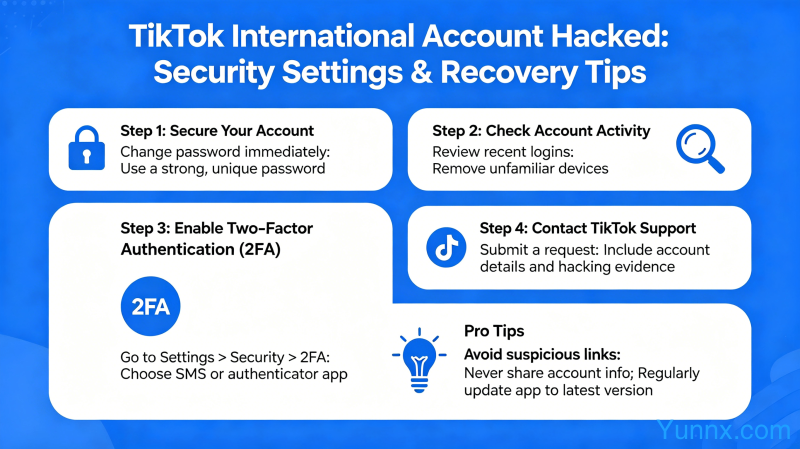
Common Signs and Emergency Identification of TikTok Account Theft
In the early stages of account theft, there are often some abnormal signs, and timely detection can greatly reduce losses:
1. Unknown device appears in the login record. Open TikTok ->Personal Page ->Settings (three dots in the top right corner) ->Manage Account ->Security, view "Device login activity". If you find an unfamiliar login device or login records from an area you have never visited before, it means that your account may have been logged in by someone else.
2. Account content has been abnormally modified. The sudden disappearance of posted videos, changes in avatars and nicknames, and the appearance of unfamiliar external links in the profile are typical signals of account theft.
3. Received an abnormal login reminder email from TikTok official. If you receive an email notification from TikTok that your account password has been reset or you have logged in with a new device, but you have not done so yourself, you should immediately click on "This is not me" in the email and try to retrieve your account.
4. Abnormal fluctuations in the number of fans or likes data. After being stolen, hackers may use your account to boost traffic or post junk content, resulting in abnormal account data.
5. When logging in, it was found that the password had been changed and I was unable to log in with my own password. This situation indicates that the account thief has already changed the password in advance and needs to immediately enter the account recovery process.
Emergency handling steps for TikTok account theft
After discovering an abnormal account, be sure to follow the following steps, time is the account:
1. Try resetting your password using the 'Forget password' function as soon as possible. If the email or phone number associated with the account is still in your hands, this method can help you regain control of the account.
If you are still able to log in, immediately enter account settings, kick out all suspicious login devices (click on devices → logout), and enable "Individual sessions" to view and disable login permissions for other devices.
3. Enable or update Two factor authentication. Find the 2FA option in the Security settings and recommend using the Authentication App instead of SMS verification, as SMS verification codes are more susceptible to hijacking.
If the password has been tampered with and cannot be retrieved through email or mobile phone, go to TikTok's account appeal page (through the "Report a problem" → "Account" → "Hacked account" path) and submit an account recovery application. Upload materials that can prove the ownership of the account, such as screenshots of the registered email or phone number.
During the appeal period, avoid repeatedly attempting login operations, as this may result in the account being temporarily locked by the system and prolong the recovery time.
Complete Guide to TikTok International Account Security Settings
Daily safety precautions should be taken, rather than regretting when problems arise:
1. Set a strong and independent password for your TikTok account. The password must be at least 12 characters long, including uppercase and lowercase letters, numbers, and special characters. Do not use the same password as other platforms, as password leaks are often caused by brute force attacks (i.e. hackers using passwords leaked from other websites to try your account).
2. Bind a genuine and valid email and phone number. This is the most important credential for account recovery, ensuring that the bound email has independent password protection and the phone number is a normal number in use. If logging in with a Google account or Apple ID, it is also important to ensure the security of the third-party account itself.
3. Enable the age restriction (Family Pairing) feature. If you set up an account for a minor, you can use the family pairing function to limit the exposure of sensitive content and private messaging, reducing the risk of the account being maliciously exploited.
4. Regularly check the login devices and activity records of the account. Check at least once a month in Manage Account → Security and remove any unfamiliar devices immediately.
5. Authorize third-party applications with caution. Many third-party tools (such as video editing apps and data analysis platforms) will request TikTok account authorization. Before authorization, it is necessary to confirm that the source of the application is trustworthy to avoid phishing apps stealing account tokens.
Analysis of the reasons for TikTok account suspension and appeal methods
In addition to being stolen, account ban/suspended by the platform is also a common issue:
1. Violating community guidelines is the main reason for account suspension. This includes posting spam advertisements, videos containing misleading information, inappropriate content for minors, hate speech, violent content, copyright infringement (unauthorized use of other people's music or video materials), etc.
2. Abnormal behavior can also trigger a ban. Such as using third-party automated scripts/robots to brush paint likes, following and unfollowing a large number of people in a short period of time, frequently switching IP addresses when using VPN causing abnormalities, etc.
3. Do not immediately register a new account after receiving the account suspension notice?? The device ID and IP associated with the banned account may be marked, and new accounts will also be banned soon. The correct approach is to appeal the current account first.
4. Appeal path: When receiving a ban notice, there will be an "Appeal" button on the notification page. After clicking on it, explain the situation in clear and concise language, acknowledge the mistake (if there is indeed a violation), and promise to abide by community rules in the future. The reasons for appeal should be specific, not just 'Please restore my account'.
If the appeal is rejected, you can wait for 30 days to appeal again (the platform will review again every 30 days). Do not attempt to create a new account or log in to the same account using other devices during this period.
Daily Safe Usage Habits and Protection Suggestions for TikTok International Version
Good usage habits are the best security line:
1. Do not click on links sent by strangers, especially phishing links claiming to help you gain followers or obtain TikTok coins or diamonds for free. TikTok officials will not request your account password through private messages.
2. After using TikTok on public devices, be sure to log out and log in. Open TikTok → Personal homepage → Settings → Manage account → Device login activity, click "Log out" to clear login records.
3. Protect the third-party account (Google/Apple ID) used to log in to TikTok. Enable separate two factor authentication for these accounts to form multiple layers of protection.
4. If you are a creator, it is recommended to enable the "Private Account" function. Without your approval, others cannot follow you, view your videos and interaction records, reducing the risk of being harassed by strangers or maliciously stealing content.
5. Regularly backup important account content records, including bound email addresses, phone numbers, account ID screenshots, etc. Once there is an issue with the account, this information can expedite the appeal process. At the same time, it is recommended to keep the original materials locally for the created video content to prevent account loss and complete content loss.
Recommend Apps