
How can I appeal if my Instagram account is banned? Instagram password recovery and account security settings
May 28, 2026
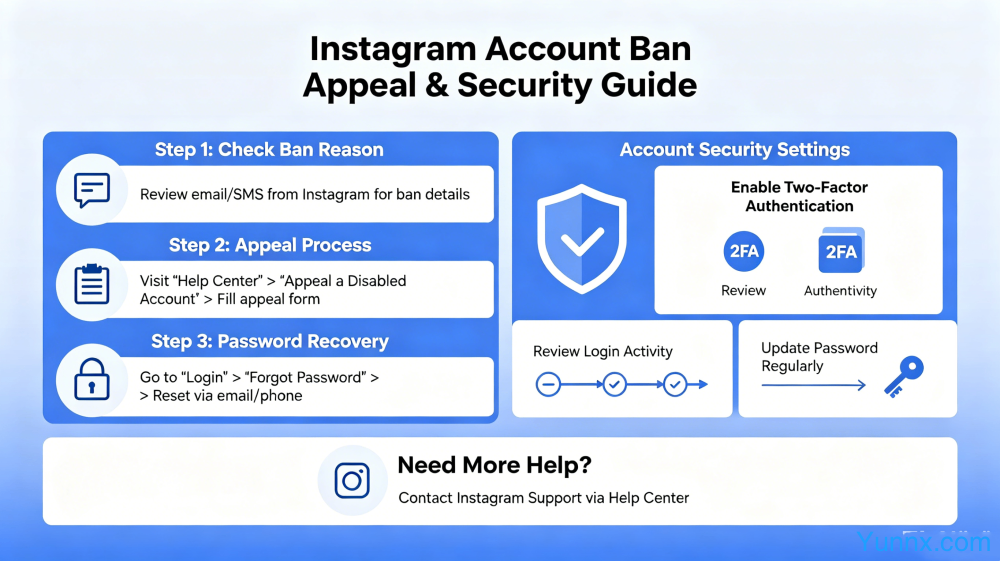
The Instagram account being banned and the password being forgotten, making it difficult for many users to log in, is a headache. This article provides a detailed explanation of the types and appeal methods for account bans in 2026, the password recovery process, and a comprehensive tutorial on account security settings.
Common reasons and types of Instagram account bans
1. Using third-party violation tools or bots: Using third-party tools or scripts such as automatic likes, automatic follow, and automatic comments is the most common reason for Instagram account suspension. The platform will identify abnormal operations through behavior analysis. The first violation is usually subject to temporary restrictions, while multiple violations result in permanent account suspension.
2. Frequent account switching or use of multi open tools: Logging in to multiple accounts on the same device for a short period of time, or using multi open applications (such as the dual open function of some domestic phones) to log in to multiple Instagram accounts, can easily trigger platform security mechanisms and lead to account suspension.
3. Posting illegal content: Posts containing violence, hate speech, pornography, vulgar content, false information, and infringing content (such as unauthorized music, film and television clips) will be deleted and punished once reported or identified by the system. Those who are serious will be directly banned.
4. Excessive marketing behavior: Posting a large amount of the same or similar content in a short period of time, frequently sending private messages to unfamiliar users, leaving a large number of links in the comment section, etc., will be judged as spam senders, and account functions will be restricted or even banned.
5. Other behaviors that violate community guidelines, such as impersonating someone else's account, purchasing fan or interaction data, participating in fraudulent activities, etc., will face account suspension once verified. Instagram's AI detection system continues to upgrade, and even abnormal behaviors that are difficult for humans to detect may be recognized.
Appeal Method for Instagram Account Blocked (Latest in 2026)
1. Appeal for temporary account restrictions (most common situation): When an account is temporarily restricted, you will see a prompt saying "Your account has been temporarily restricted" after logging in. Click on 'Learn More', then select 'Submit Request', follow the system prompts to complete the verification (usually by identifying the image or verification code), and wait for the review result, which usually takes 24-48 hours.
2. Formal appeal process for permanent account suspension: If the account is permanently banned, click "Learn More" on the login page and select "Submit Request" to appeal. When appealing, you need to fill out the appeal form in English, which includes: explaining the importance of your account to yourself, indicating that you understand and will comply with the platform rules, and promising not to engage in any further violations in the future. We usually receive a reply within 1-3 working days after submitting the email.
3. Submit an appeal through the Help Center: Visit the Instagram Help Center (help. instagram. com), find the "Disabled Account" option in the "Account" related questions, and follow the instructions to submit an appeal application. This is a direct channel to bypass the restrictions on the app.
4. Key skills when appealing: The appeal document should be in English, with a sincere but not overly humble attitude, and a concise and clear explanation of the situation. Avoid mentioning statements in the appeal that question the platform's judgment, such as' this is a mistaken ban ', and do not repeatedly submit appeals, as repeated submissions will prolong the review time.
5. Alternative options after appeal failure: If the official appeal fails and the account is indeed mistakenly banned, you can try to wait for 30 days to resubmit the appeal (platform policies may be updated during this period), or seek help through Facebook associated accounts (in the Meta unified login system, Facebook account customer service response is usually more timely).
Multiple ways to recover Instagram password
1. Reset password by registering an email: Click on "Forgot password" on the Instagram login page, enter the email address you used to register, and Instagram will send a reset link to your email. Click the link to set a new password. This is the most recommended way to retrieve your password.
2. Reset through phone number: If your Instagram account is bound to a phone number, select "Send SMS" on the password recovery page, and the system will send a verification code to your phone number. After entering the verification code, you can reset your password. The premise is that the phone number can still be used normally.
3. Retrieve through Facebook account association: If your Instagram account is associated with a Facebook account, you can select "Log in with Facebook" on the login page and directly log in to Instagram through Facebook authorization. After logging in, you can change your password in the settings.
4. Retrieve through username search: If you forget to register your email and phone number but still remain logged in to the app, you can go to "Settings → Account → Personal Information" to view some information about the email and phone number associated with the current account (some information will be hidden and displayed).
5. Contact Instagram customer service: If none of the above methods can retrieve it, you can try using Instagram's built-in "Get More Help" portal to describe your situation, submit identification (such as a screenshot of the bound email, account avatar photo, and other auxiliary information), and wait for manual customer service processing.
Complete Guide to Instagram Account Security Settings
1. Enable Two Factor Authentication: This is the most effective way to protect an account. Go to "Settings → Security → Two Factor Authentication" and it is recommended to choose "Authentication App" as the main method, which is more secure than SMS captcha. After setting up, a verification code needs to be entered every time a new device is logged in.
2. Bind trusted contacts: Set trusted contacts in "Settings → Security → Trusted Contacts", which can help you restore account access when you are unable to access your account. Suggest choosing 2-3 real friends or family members.
3. Regularly check login activity: Go to "Settings → Security → Login Activity" to view all device and location records that have logged into your account. If you find an unfamiliar device or a login record from a different location, immediately click on the device and select "Log out" to log out, then change your password.
4. Linking Facebook accounts: Linking Instagram with Facebook accounts allows for faster recovery through Facebook channels in case of login issues or account theft, while also enhancing the authenticity rating of the account.
5. Set a strong password and change it regularly: Instagram passwords are recommended to use a combination of 12 or more characters, including uppercase and lowercase letters, numbers, and special symbols. Do not use the same password as other platforms. It is recommended to use a password manager (such as 1Password, KeePass, etc.) to generate and store strong passwords.
Emergency handling and prevention of Instagram account theft
1. Emergency handling steps for account theft: If it is found that the account password has been tampered with and cannot be logged in, first try resetting the password through email or phone number. If the attacker has changed the bound email, you may not see notifications in the reset email. In this case, you need to submit a complaint through "Get more help" and explain the account theft situation in the complaint.
2. Check if the email associated with the account has been tampered with: Attackers often change the bound email first after stealing the account. It is recommended to develop the habit of regularly checking account binding email and phone numbers on a daily basis. Once any abnormal changes are found, control should be immediately regained through the original binding information.
3. Disable suspicious third-party application permissions: Go to "Settings → Security → Apps and Websites" to view all authorized third-party applications, remove applications that you no longer recognize or use, and reduce the risk of account leakage through third-party applications.
4. Prevention oriented safety habits: Do not use public WiFi to log in to Instagram; Do not click on suspicious links sent by strangers; Be highly vigilant about emails or private messages requesting Instagram account passwords (Instagram officials will not proactively ask for passwords); Enable the app lock for the Instagram app in the phone settings.
5. Reinforcement operation after account recovery: Immediately change the password and check the account settings after recovering the account, update all security information, enable two factor authentication, view and revoke all unfamiliar login devices, and confirm that personal information and published content have not been tampered with.
Recommend Apps