What are the privacy settings for Telegram? Detailed explanation of privacy protection functions and anti blocking techniques
May 14, 2026
What are the privacy settings for Telegram? This article provides a detailed introduction to Telegram's privacy protection features (secret chat/phone number hiding/online hiding/two-step verification), steps for configuring privacy settings correctly, methods for appealing after account suspension, and channel group operation techniques. It is suitable for users who value privacy to refer to.
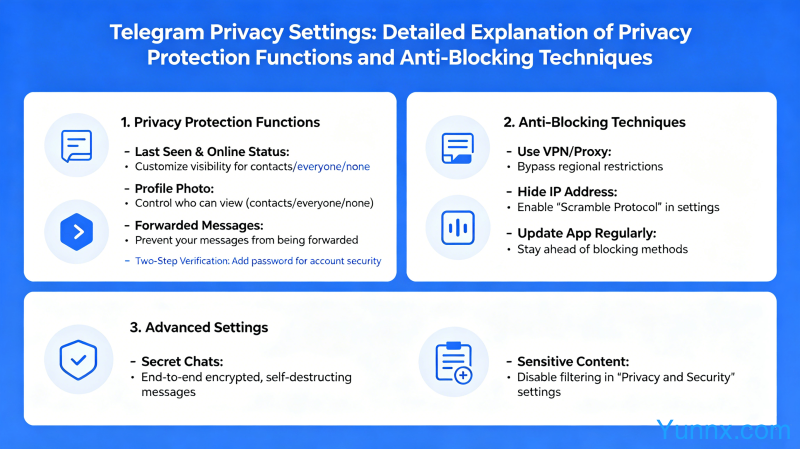
What privacy protection features does Telegram have?
1. Secret Chat: End to end encryption, messages are burned immediately after reading, screenshot notification, and automatic message destruction time can be set (ranging from 30 seconds to 1 week).
2. Phone number hiding: By default, only contacts who follow each other can see their phone numbers; You can completely hide your phone number in privacy settings or only allow specific contacts to view it.
3. Hide last online time: Set who can see your "last online" time, choose "Everyone", "My Contacts" or "No one".
4. Online status hiding: Even if the last online time is not hidden, the "typing in" status can be set to not be displayed.
5. Two factor authentication (2FA): In addition to password protection, additional email verification is set up, so even if your phone number is copied, you cannot log in to your account.
How to configure Telegram privacy settings correctly?
1. Open Privacy Settings: Click on the menu in the upper left corner → Settings → Privacy and Security.
2. Phone number setting: Select "Nobody" as the phone number; If you need someone to see it, click 'Always allow' to add it to the whitelist.
3. Last online time: Set to "My contacts" or "Nobody" to avoid strangers checking your online status.
4. Forwarding message settings: Set to "My contacts" to prevent others from linking to your account through forwarding messages.
5. Group invitation settings: Set to "My contacts" to avoid being pulled into unfamiliar groups.
What should I do if my Telegram account is banned?
1. Reason for account suspension: Using a third-party client (unofficial Telegram) may trigger account suspension; Sending spam messages, being reported by multiple people, and posting advertisements in groups can all trigger account suspension.
2. Appeal method: Visit https://t.me/SpBot And enter/start; Submit the appeal application according to the prompts; Provide registered mobile phone number and account username; Explain the purpose of the account and promise to comply with community guidelines.
3. Appeal waiting time: usually takes 24-72 hours to process; The success rate of appeals for partially permanently banned accounts is relatively low.
4. Prevent account suspension: use the official Telegram client; Do not frequently send the same content; Avoid joining a large number of unfamiliar groups; Do not use any automation tools (except bots, but apply for official APIs).
Telegram channel and group operation skills
1. Create a channel: Click on the menu in the upper left corner → New Channel → Fill in the channel name and description → Select public or private channel; The public channel will receive a link to t.me/username.
2. Group permission management: Click on the group name → Edit → Permissions; Suggest disabling the 'Change Chat Info' and 'Pin Message' permissions, allowing only administrator operations.
3. Anti spam message: Enable "Slow Mode" in group settings to limit the sending frequency; Enable the 'Report' function to allow members to report spam messages.
4. Monetization method: Telegram supports Star tipping function; Channels can be set up with paid subscriptions; Cryptocurrency payments can also be accessed through bots.
Recommend Apps