What should I do if ChatGPT interrupts halfway through the response? Reasons and Solutions for ChatGPT Interruption
May 14, 2026
What should I do if ChatGPT interrupts halfway through the response? This article provides a detailed introduction to the reasons for interrupted ChatGPT responses (token restrictions/network issues/speed limitations/content filtering), quick solutions (send continue/refresh page/clear history), and tips on how to fundamentally avoid interruptions.
What are the common reasons for interrupted ChatGPT responses?
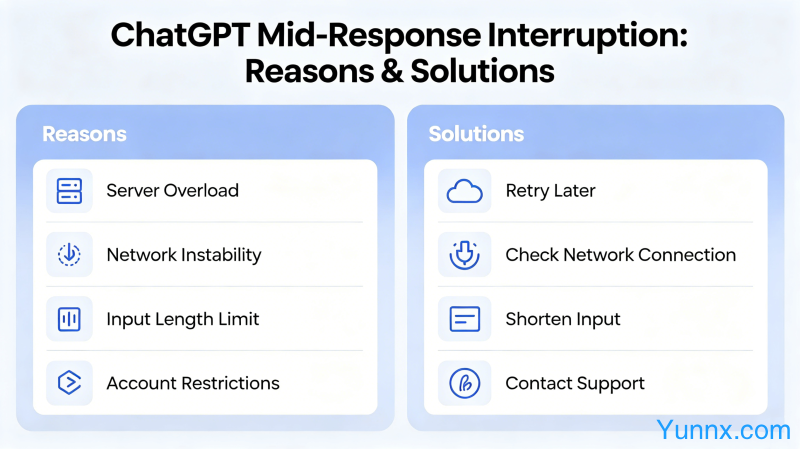
1. Token restriction: ChatGPT has a maximum token limit for a single conversation (GPT-3.5 is about 4096 tokens, GPT-4 is 8192 or 32768 tokens depending on the version). When the conversation content approaches the limit, new replies will be truncated. Tokens not only include your question, but also the entire conversation history, so long conversations are more likely to trigger interruptions.
2. Network connection issues: Server response timeout or network fluctuations can cause API call interruptions, which occur randomly.
3. Account usage restrictions: Free users may trigger a rate limit during peak usage periods, resulting in interrupted responses; Plus subscribers also have a limit on the number of messages per 3 hours.
4. Content security filtering: The reply content triggers the security filtering mechanism, and the API will truncate the content during the generation process, resulting in incomplete display.
5. Browser plugins or ad blockers interference: Some browser extensions may modify page content, causing ChatGPT responses to be truncated and displayed.
How to quickly solve the problem of interrupted ChatGPT answers?
1. Send "continue" or "continue": Send "please continue" or "continue" directly at the interruption point, and ChatGPT will continue to output the remaining content from the interruption point. This is the simplest and most effective method.
2. Refresh the page and restart the conversation: If "continue" does not work, refresh the page and open a new conversation, copying and pasting the previous key information into the new conversation to continue.
3. Use API interface: If you are a developer or have API usage permissions, calling ChatGPT through the API can set a higher max_token parameter to reduce truncation.
4. Clear conversation history: Delete some early conversations in the settings to reduce token usage and leave more space for new replies.
How to fundamentally avoid ChatGPT answer interruptions?
1. Split questions: Split long questions into multiple short questions and ask them separately, with each question limited to 500 words, which can significantly reduce token consumption.
2. Clear segmentation requirements: When asking a question, tell ChatGPT to "please output in three paragraphs, each paragraph should not exceed 500 words". Clear requirements can control the output length.
3. Use System Prompt: Set "Your answer should not exceed 300 words per paragraph, and if there is more content, I will tell you to continue" at the beginning of the conversation to actively control the output length.
4. Activate ChatGPT Plus: If the usage frequency is high, activate the Plus subscription to obtain higher speed limits and more stable responses.
What is the difference between ChatGPT Plus and the free version?
1. Speed limit: Plus users can send about 120 messages per 3 hours (GPT-4), while free users have stricter limits, with peak periods possibly only 10-20 messages.
2. Response speed: Plus users prioritize the use of computing resources, and the response speed is significantly faster than that of free users.
3. Model version: Plus users can use the GPT-4 model, which has significantly stronger capabilities than GPT-3.5; Free users can only use GPT-3.5.
4. New feature experience: Plus users have priority to experience OpenAI's new features (such as plugins, internet search, GPTs, etc.), and free users need to queue up.
Recommend Apps